Google Authenticator vs Microsoft Authenticator
I have both of these apps on my Samsung phone. When I scan a QR code to add a 2FA account, I do it with both apps in order to have a backup.
However one thing that I found out this morning is that I bought a new phone and installed both apps.
With the Google app on the new phone, when I logged into my Google account on the Authenticator app on my new phone, the accounts on the old phone, were automatically added to the app’s list via the Cloud.
However the Microsoft app on the new phone, did NOT add any of the accounts from the old phone!
What you have to do is first go to the settings on the old phone and enable the back up. The Authenticator accounts will then be backed up to your Microsoft account.
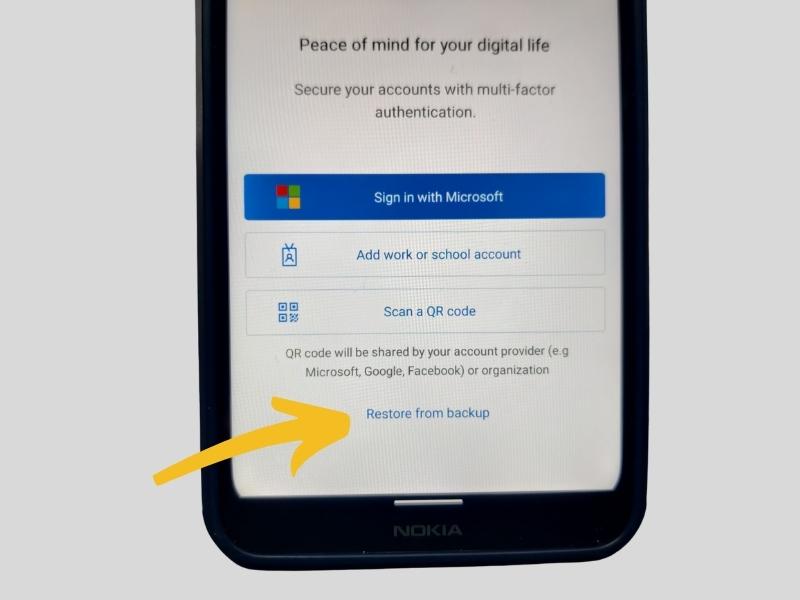
Next on the new phone, open the app but do NOT sign into your Microsoft account. Instead, click the “Restore from backup” link at the bottom of the sign in page.
You will then be asked to sign into your Microsoft account and probably have to retrieve a two digit number from the old phone as part of the process.
Now the app on the new phone, will show the accounts that were on your old phone.
If you make a mistake on your new phone, you must uninstall the app and reinstall and start from scratch.
Please note that the Microsoft Authenticator does not back up to your Microsoft account by default. You need to enable it in the settings so that your accounts are backed up in the event of something happening to your phone which will take ALL of your accounts with it!